every business running google ads eventually asks the same question: how do i pay less per click? the honest answer is that “lower the CPC” is the wrong framing. what you actually want is a lower cost per lead and a lower cost per customer, which is a different problem with different solutions.
raw CPC is determined by an auction you share with competitors. you have limited control over that number. what you can control is quality score, match types, targeting precision, landing page conversion, and the campaigns you choose to bid on at all. those levers, applied together, typically cut effective costs 30-60% in the first 90 days of a real optimization push.
the difference between CPC, CPL, and CPA
three metrics that get confused and shape every decision.
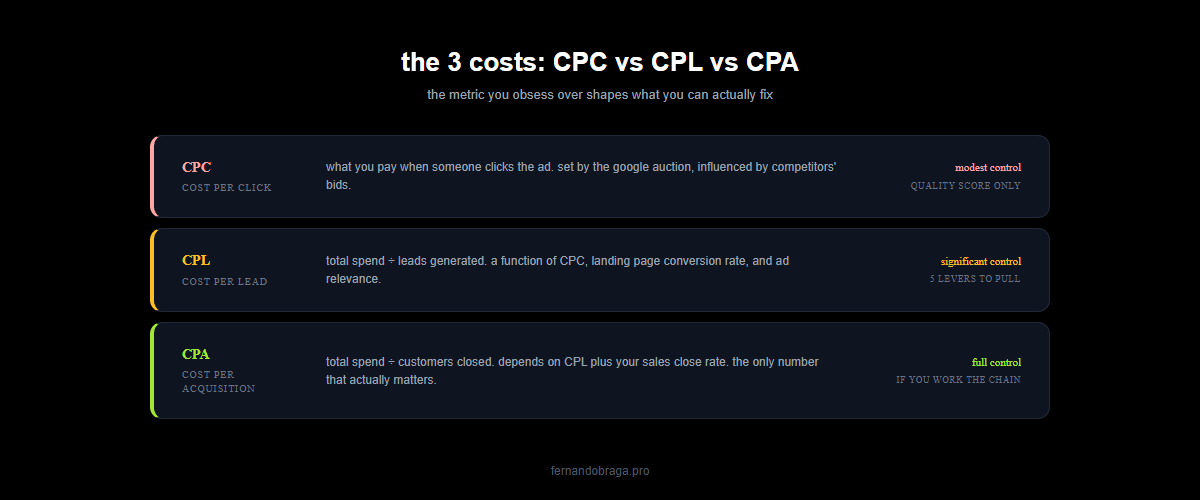
CPC (cost per click): what you pay when someone clicks your ad. set by auction. you have modest control.
CPL (cost per lead): total spend divided by leads generated. influenced by CPC, landing page conversion rate, and ad relevance. you have significant control.
CPA (cost per acquisition, or cost per customer): total spend divided by customers closed. influenced by CPL plus your sales close rate. you have full control if you are willing to work on every layer.
businesses that obsess over CPC often have bad CPL and worse CPA. businesses that optimize the full chain end up paying less overall even when their CPC is higher.
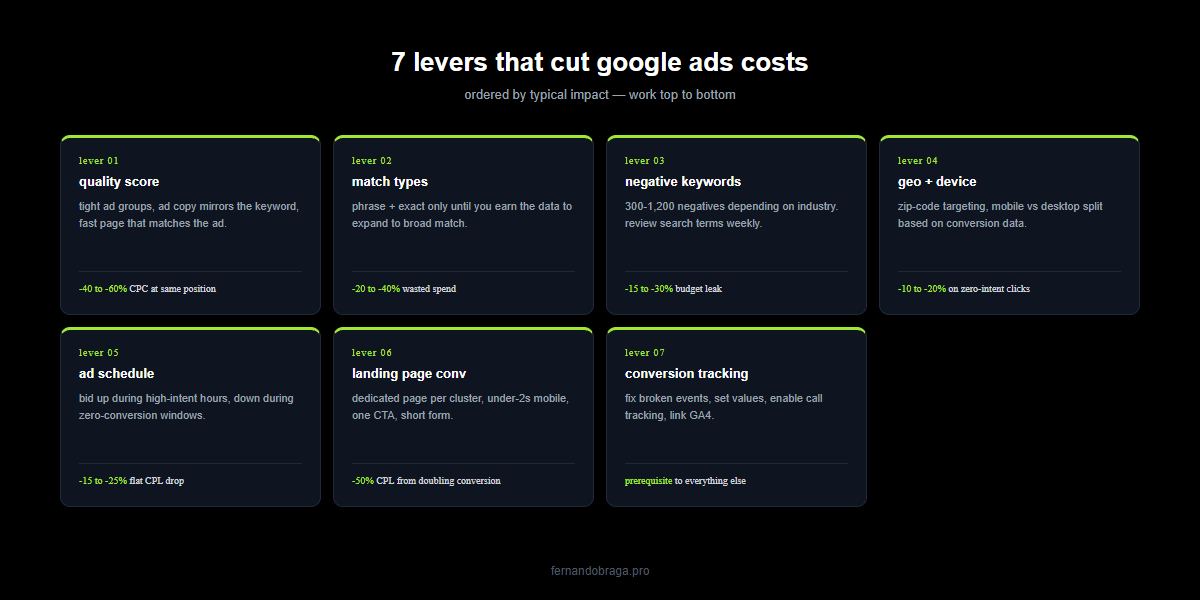
lever 1: quality score (the 50% discount most advertisers ignore)
google assigns every keyword a quality score from 1-10 based on three sub-factors:
- expected click-through rate
- ad relevance
- landing page experience
the math google runs: your actual CPC = (competitor’s ad rank / your quality score) + $0.01. higher quality score = lower CPC for the same position.
practical impact: a keyword with a 10/10 quality score pays 50-60% less per click than a keyword with a 5/10 quality score for the same ad position. that is the biggest single lever in the entire platform and most advertisers ignore it completely.
how to raise quality score
tight ad groups. one ad group per narrow keyword cluster. “dentist near me” gets its own ad group, its own 3 ads written specifically for that query, its own landing page. not bundled with “teeth whitening” and “emergency dentist” and “dental implants” in one group. tight grouping pushes ad relevance and CTR up.
ad copy that mirrors the keyword. if the keyword is “emergency dentist chicago,” the ad headline should literally be “emergency dentist chicago.” exact match between query intent, ad copy, and landing page content raises all three quality score factors simultaneously.
landing page that matches the ad. the page headline should be near-identical to the ad headline. the content should directly answer what the search was asking. generic homepages score landing page experience badly.
fast mobile page. page experience is a quality score input. pages that load in under 2 seconds on mobile score higher than pages that load in 5+ seconds. slow pages pay more per click for the same ad position.
lever 2: match types (stop broad matching unless you have the budget)
google defaults new campaigns to broad match. broad match shows your ad for anything google considers “related” to your keyword. “dentist in chicago” becomes “dental school chicago admissions,” “chicago dentist salary,” “is dentistry hard.”
broad match has use cases (discovery campaigns, large-budget accounts with strong negative lists), but for most small-to-mid budget accounts, it burns 30-40% of spend on irrelevant queries.
start with: phrase match and exact match only. expand to broad match only after you have 60 days of search terms data and a well-maintained negative keyword list.
the immediate cost impact: switching a small account from broad match to phrase + exact match typically cuts wasted clicks by 20-40% in the first week. that is spend freed up for the keywords that actually convert.
lever 3: negative keywords (the spend filter most accounts neglect)
every industry has queries that look relevant to google but are useless to your business. negative keywords block your ads from showing on those queries.
common negative keyword categories across most industries:
- job seekers: “jobs,” “salary,” “hiring,” “careers,” “apprentice”
- diy searchers: “how to,” “diy,” “youtube,” “tutorial”
- free/cheap: “free,” “cheap,” “discount,” “coupon”
- competitors you do not want to bid on: specific competitor names
- services you do not offer: adjacent services that pull the wrong intent
- informational queries: “reviews of,” “what is,” “definition” (unless you run content marketing alongside)
a well-maintained negative keyword list for a dental practice is 300-500 terms. for a contractor, 600-800. for a law firm, 800-1,200. most accounts launch with 10-20 negatives and never update the list.
the search terms report is where this gets fixed. review it weekly for the first 60 days, monthly after that. every irrelevant query you find becomes a negative. the wasted-spend reduction compounds month over month.
lever 4: geographic and device targeting
defaults here leak budget on zero-intent traffic.
geographic: a local service business should not be bidding on people 50 miles away. most google ads accounts are set up with “people in or interested in your targeted locations” which includes anyone who searched the city name from anywhere in the world. switch to “presence: people in or regularly in your targeted locations” to restrict to actual geography.
zip-code level targeting for service area businesses. include only the zip codes you actually serve, bid higher in your primary service area, bid lower at the edges.
device split: emergency services should bid up on mobile. b2b and considered-purchase services often convert better on desktop. default campaigns bid flat across devices, which is always suboptimal.
lever 5: ad schedule (when you bid matters as much as what you bid)
demand is not flat across the day. for most industries:
- emergency services see 30-50% of demand outside business hours with 70% lower competition
- b2b services see 80% of conversions between 10am-4pm on weekdays
- retail and e-commerce see spike from 6-9pm when people browse after dinner
- legal and medical consults see spike in the hour before and after lunch
adjusting bid multipliers by hour of day (dayparting) can cut costs 15-25% without reducing lead volume. you simply pay less during lower-intent hours and more during high-intent hours.
look at your own data. the hour-of-day report in google ads tells you when your conversions actually happen. bid up during those hours. bid down during the zero-conversion windows.
lever 6: landing page conversion rate (where CPL actually gets fixed)
if your CPC is $25 and your landing page converts at 3%, your CPL is $833. if the same CPC with a 15% conversion page, your CPL drops to $167. a 5x difference from page design alone.
what moves conversion rate on landing pages:
- page speed under 2 seconds on mobile. non-negotiable. slow pages lose 50%+ of traffic before the page renders
- match between ad and page headline. if the ad says “emergency dentist chicago,” the page should say “emergency dentist chicago,” not “welcome to smile dental clinic”
- single clear call to action above the fold. not 5 options. one.
- phone number visible and clickable on mobile. large, sticky, obvious
- trust signals: reviews, credentials, years in business, specific guarantees
- short forms. 3-4 fields max. every extra field drops conversion 5-10%
most accounts can double their conversion rate with a dedicated landing page for each major keyword cluster. that alone cuts CPL in half without touching the bid.
lever 7: conversion tracking (fix the data or nothing else helps)
bidding strategies like “maximize conversions” and “target CPA” optimize based on conversion data. if your conversion tracking is broken, or if you are tracking page views instead of actual leads, google’s algorithm optimizes for the wrong thing and your costs balloon.
what to verify:
- conversion tracking fires on actual leads (form submissions, calls over 60 seconds), not on page views
- each conversion has an assigned value (even an estimate) so google can optimize for value, not just count
- calls from ads get tracked as conversions (enable call reporting in google ads)
- GA4 is linked to google ads and conversion data flows correctly
i have audited accounts spending $20,000/month with broken conversion tracking. once fixed, CPL dropped 40% in 60 days without any other change. just accurate data.
what does NOT lower your costs (despite what you will read)
lowering your max CPC bid. this sounds obvious but it often increases your CPL. lower bids mean lower ad positions, which mean lower CTR and worse quality score, which means you pay more per click at the lower position. you end up with fewer conversions at a worse rate.
switching to a cheaper keyword. “dentist” is cheaper than “emergency dentist” because the intent is mixed. cheaper keywords almost always convert worse. you save on CPC and pay more on CPL.
pausing high-performing campaigns because they are “expensive.” the expensive campaign might be your highest-ROI campaign. look at CPA and revenue, not CPC in isolation.
turning on “maximize clicks” to get more traffic for the same budget. this strategy optimizes for click volume, not conversions. you get more worthless clicks. costs go up on the metric that matters.
the 30-day optimization sprint
a practical sequence for cutting costs:
week 1: audit conversion tracking. fix broken events. set conversion values. verify call tracking works.
week 2: review search terms reports for last 90 days. add 100-300 negative keywords. switch broad match keywords to phrase or exact.
week 3: split oversized ad groups into tight 5-10 keyword clusters. rewrite ads for each group to mirror the keyword. create dedicated landing pages for top 3 ad groups.
week 4: set up dayparting based on hour-of-day conversion data. adjust device bid modifiers. tighten geographic targeting to actual service area.
expected result: 20-40% CPL reduction by day 60 in most accounts. 50-60% in accounts that were badly neglected before.
next step
if you want a specific analysis of where your google ads spend is leaking and which of these levers would move the needle fastest for your account, start with a free audit. i pull the actual account data, walk through the top 5 cost leaks, and show you the 3 highest-leverage changes you can make this month.