
you’re paying for clicks. but what happens after someone clicks your ad?
if they land on your homepage, you’re probably losing most of them. your homepage has too many options, too many distractions, and no clear path to convert. that’s money leaving your pocket with every click.
a dedicated landing page fixes that. and for local businesses running google ads, the landing page is often the difference between a profitable campaign and a money pit.
this post covers what makes a landing page convert, what to include, and how to build one without hiring a developer.
why your homepage is not a landing page
your homepage serves multiple purposes. it introduces your business, links to services, shows your about page, has blog posts, maybe a gallery. it’s designed for exploration.
a landing page has one job: get the visitor to take one specific action.
when someone clicks your google ad for “emergency dentist near me,” they don’t want to browse your team photos. they want to know you can help them right now and how to contact you.
here’s the core problem with sending ad traffic to your homepage:
- navigation bar gives people 5+ places to click away
- no single clear call to action
- content isn’t matched to the ad they clicked
- load time is slower because of all the extra elements
i’ve seen businesses cut their cost per lead (the amount you pay to get one person to contact you) by 40-60% just by switching from homepage to a dedicated landing page. it’s one of the most common google ads mistakes local businesses make.
what a high-converting local landing page looks like
a good landing page follows a structure. it’s not random. every section exists to move the visitor closer to contacting you.
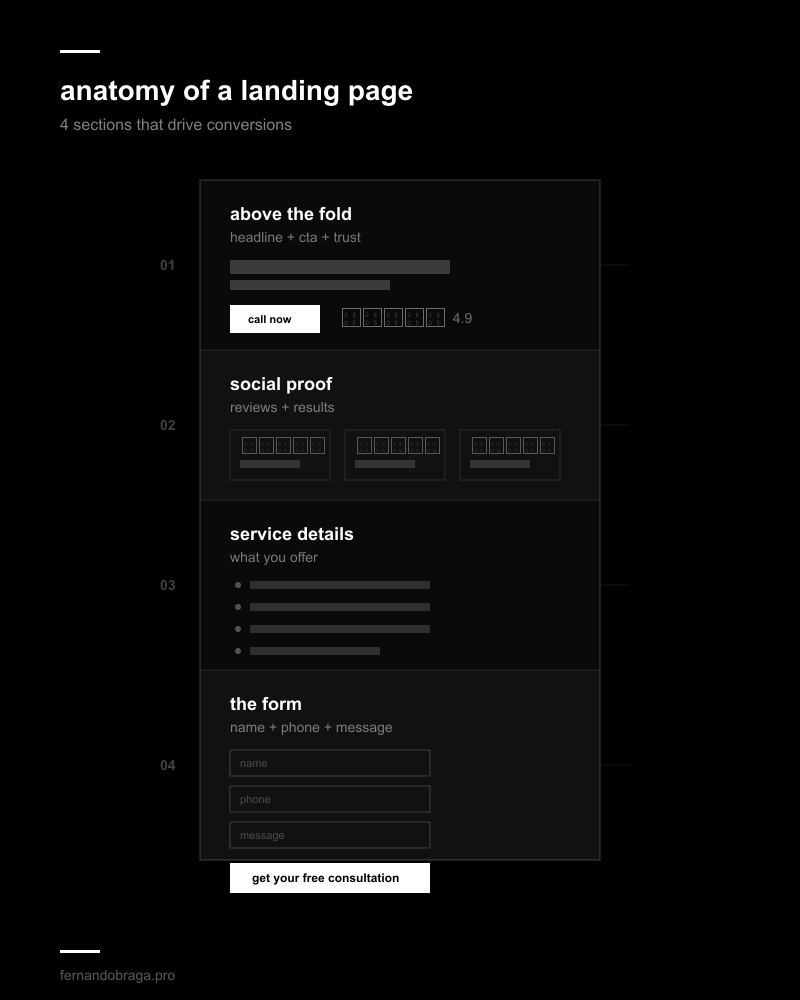
above the fold: headline, cta, trust signals
“above the fold” means what the visitor sees before scrolling. this is the most important section of your entire page.
it needs three things:
- a headline that matches your ad. if your ad says “same-day emergency dental care,” your landing page headline should say the same thing. not something generic like “welcome to our practice”
- a clear call to action (cta). a button that says “call now” or “book your appointment” with your phone number visible. don’t make them search for it
- trust signals. your google rating, number of reviews, years in business, or any certifications. this gives instant credibility
if someone lands on your page and can’t figure out what you do and how to contact you within 3 seconds, your above-the-fold section needs work.
social proof: reviews and results
people trust other people more than they trust your marketing. your landing page needs social proof, and it needs to be specific.
don’t just say “5-star rated.” show actual reviews. pull 3-5 of your best google reviews and display them with the reviewer’s first name and star rating.
if you have numbers, use them:
- “500+ patients treated this year”
- “serving [city] since 2015”
- “4.9 stars from 200+ google reviews”
specificity builds trust. vague claims don’t.
service details: what you offer
keep this focused on the specific service your ad promotes. if you’re running an ad for teeth whitening, don’t list every dental service you offer. talk about teeth whitening.
cover three things:
- what the service includes
- who it’s for
- what makes your approach different
use short paragraphs and bullet points. nobody reads walls of text on a landing page, especially on mobile.
the form: keep it short
every extra field on your form costs you conversions. for most local businesses, you need three fields max:
- name
- phone number
- brief message (optional)
that’s it. you don’t need their email, address, insurance provider, and date of birth just to book an initial consultation. get the lead first. collect details when you call them back.
if you’re not sure whether your forms are actually being tracked properly, read my guide on how to track leads from google ads.
landing page examples by industry
the structure stays the same across industries. the messaging changes. here’s what the key elements look like for different local businesses:
dentists: headline focused on the specific treatment (implants, emergency, cosmetic). before/after photos as social proof. “book your consultation” as the primary cta.
lawyers: headline addressing the specific legal need (“injured in an accident?”). case results or settlement amounts as social proof. “get your free case review” as the cta. phone number prominent because legal leads often call directly.
home services (plumbers, hvac, electricians): headline emphasizing speed and availability (“same-day service in [city]”). licensing and insurance badges as trust signals. “get a free estimate” with a simple form.
medical clinics: headline about the condition or treatment. doctor credentials and certifications visible. “schedule your appointment” with online booking integration if possible.
the pattern is the same: match the ad, prove you’re trustworthy, make it easy to contact you.
mobile-first design (why it’s non-negotiable)
for most local businesses, 60-80% of google ads clicks come from mobile devices. if your landing page doesn’t work perfectly on a phone, you’re wasting the majority of your ad spend.
mobile-first means:
- click-to-call button fixed at the top or bottom of the screen. the visitor shouldn’t have to scroll to find your phone number
- fast load time. under 3 seconds. compress your images, minimize scripts, use a fast host. google’s own data shows that 53% of mobile users leave a page that takes more than 3 seconds to load
- thumb-friendly buttons. small links and tiny form fields don’t work on touchscreens. buttons should be large enough to tap easily
- no horizontal scrolling. everything should fit the screen width without requiring side-to-side scrolling
- readable text without zooming. minimum 16px font size for body text
test your landing page on your own phone before launching any campaign. better yet, test it on multiple devices. what looks fine on your iphone might break on a smaller android screen.
testing and improving your landing page
your first version won’t be your best version. the businesses that get the best results from google ads are the ones that keep testing their landing pages.
start with these tests:
- headline variations. test a benefit-focused headline (“get pain-free dental care today”) against a problem-focused one (“tired of dental anxiety?”)
- cta button text. “book now” vs “get your free consultation” vs “call us today.” small wording changes can have a big impact
- form length. try removing one field and see if conversions increase
- social proof placement. test reviews above the fold vs below the service description
you don’t need to test everything at once. change one thing, run it for 2-4 weeks with enough traffic, and compare results. this is called a/b testing, and it means showing two different versions of your page to different visitors to see which performs better.
track conversions properly. if you don’t know which version generates more leads, testing is pointless. make sure your form submissions and phone calls are being tracked in google ads.
tools to build landing pages (without a developer)
you don’t need to code a landing page from scratch. several tools make it easy to build high-converting pages with drag-and-drop editors.
for wordpress users:
- elementor pro. the most popular page builder. has landing page templates, form widgets, and popup builders. works with any wordpress theme
- thrive architect. built specifically for conversion optimization. includes a/b testing features and countdown timers
standalone tools:
- unbounce. dedicated landing page platform. built-in a/b testing and smart traffic features that automatically send visitors to the best-performing variant
- leadpages. simpler and more affordable than unbounce. good templates for local businesses
- carrd. ultra-simple one-page builder. limited features but extremely fast to set up and very affordable ($19/year)
for most local businesses running google ads, elementor pro on wordpress or a standalone tool like unbounce will cover everything you need.
the tool matters less than the structure. a well-structured landing page on a free wordpress theme will outperform a poorly structured page on the most expensive platform.
if you want someone to review your current landing page and identify what’s costing you conversions, request a free audit and i’ll break it down for you.