
what are negative keywords and why they matter
negative keywords tell google which searches should not trigger your ads. they are the filter between your budget and irrelevant clicks.
without them, your ads show up for searches that have nothing to do with your business. someone searching “dentist salary” sees your dental clinic ad. someone searching “free legal advice” clicks your law firm ad. you pay for both clicks. neither converts.
negative keywords fix this. they block specific terms so your ads only appear for searches that actually match what you offer. every google ads account needs them from day one.
think of it this way: regular keywords tell google when to show your ad. negative keywords tell google when to hide it. both are equally important for campaign performance.
how much money bad keywords waste (real examples)
here is what happens without negative keywords in real local service campaigns:
- a dental clinic spending $2,000/month had 34% of clicks from job seekers searching “dental assistant jobs near me”
- a law firm paying $8 per click was getting clicks for “law school requirements” and “paralegal salary”
- a plumber running ads got clicks for “how to fix a leaky faucet diy” at $6 each
in each case, adding negative keywords cut wasted spend by 20-40% in the first month. that is money redirected to clicks that actually book appointments.
if you are making other common google ads mistakes, negative keywords are usually the fastest fix. they do not require new ad copy or landing pages. just a list of words you do not want.
types of negative keyword match types
negative keywords have three match types, just like regular keywords. but they work slightly differently. understanding the difference prevents you from blocking too much or too little traffic.
broad negative
blocks your ad when the search contains all the negative keyword terms, in any order. this is the default match type.
example: negative keyword free consultation blocks “free consultation lawyer” and “consultation free online.” it does not block “free legal help” because both words need to be present.
use broad negatives for general terms you want to exclude across variations.
phrase negative
blocks your ad when the search contains the exact phrase in order. add quotes around the term.
example: negative keyword “dental jobs” blocks “dental jobs near me” and “best dental jobs.” it does not block “dental assistant jobs” because “dental jobs” is not an exact phrase match there.
use phrase negatives when word order matters for the meaning you want to block.
exact negative
blocks your ad only when the search matches the exact term. add brackets around the term.
example: negative keyword [free dentist] blocks only “free dentist.” it does not block “free dentist near me” or “dentist free consultation.”
use exact negatives sparingly. they are too specific for most situations. broad and phrase negatives cover more ground.
how to find negative keywords for your campaigns
there are two approaches: reactive (finding bad searches after they happen) and proactive (blocking them before launch). you need both.
search terms report walkthrough
the search terms report shows you every actual search that triggered your ad. this is where you find the waste.
to access it: go to your campaign, click “insights and reports,” then “search terms.” sort by cost to see where money is going first.
look for these patterns:
- searches with zero conversions but multiple clicks
- searches containing “jobs,” “salary,” “career,” “hiring”
- searches with “free,” “diy,” “how to,” “tutorial”
- searches for locations you do not serve
- searches for services you do not offer
- competitor brand names (unless you are targeting them intentionally)
review this report weekly for new campaigns, biweekly for established ones. every week you skip is money wasted on irrelevant clicks.
pre-launch negative keyword lists by industry
do not wait for bad clicks to start adding negatives. build a starter list before your campaign goes live.
start with the universal negatives below, then add industry-specific terms. combine this with the right bidding strategy and your campaigns launch with a much tighter budget from the start.
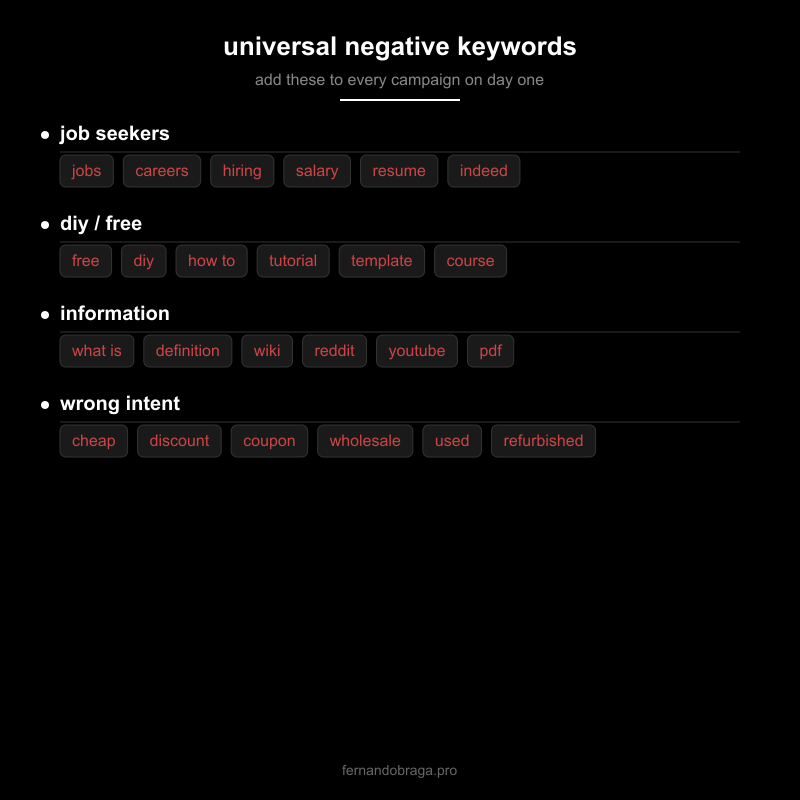
negative keyword lists for local service businesses
google ads lets you create shared negative keyword lists. build one list per category and apply them across campaigns. this saves time and keeps things consistent.
universal negatives (jobs, salary, free, diy)
add these to every local service campaign regardless of industry:
job related: jobs, careers, hiring, salary, resume, indeed, glassdoor, linkedin, internship, volunteer, certification, training program, school, degree, requirements
diy and free: free, diy, how to, tutorial, template, course, class, youtube, video, reddit, forum, wiki, definition, “what is”
wrong intent: cheap, cheapest, discount, coupon, wholesale, used, refurbished, comparison, vs, review, reviews, complaint, lawsuit, scam
geographic (if local): add cities and states you do not serve. if you are a dentist in austin, add “houston,” “dallas,” “san antonio” as negatives.
industry-specific examples
dental clinics: dental school, dental hygienist salary, dental assistant program, dental insurance plans, dental lab, dental supply, dental equipment
law firms: law school, bar exam, paralegal, legal aid, pro bono, law degree, legal templates, court forms, self represent
medical clinics: nursing school, medical assistant salary, medical billing, medical coding, home remedies, webmd, symptoms, side effects
home services (plumbing, hvac, electrical): parts, wholesale, supply house, how to install, diy repair, manual, diagram, tool rental
these lists are starting points. your search terms report will reveal terms specific to your market that no generic list covers.
how often to review and update negatives
negative keyword management is not a one-time task. here is the schedule that works:
first 2 weeks: check search terms daily. new campaigns attract the most irrelevant traffic early on. this is when you catch the big leaks.
weeks 3-8: check twice per week. traffic patterns stabilize but new irrelevant terms still appear regularly.
ongoing: check weekly or biweekly. set a recurring calendar reminder. even mature campaigns pick up new irrelevant searches as google expands match types.
when you add negatives, check your impression volume the next day. a sudden drop means you may have blocked something too broad. adjust the match type from broad to phrase or exact if needed.
keep a running document of every negative keyword you add and why. this becomes your playbook for future campaigns and new clients in the same industry.
if your campaigns are bleeding budget and you are not sure where to start, request a free audit and i will review your search terms report and identify the biggest opportunities.