how to track leads from google ads (without losing data)

you’re spending $2,000/month on google ads. your agency says it’s going great. but when you check your calendar, you can’t tell which patients came from ads, which came from google maps, and which came from a referral.
this is the most common problem i see with local businesses running google ads. the campaigns might actually be working, but without proper tracking, there’s no way to know. you’re making budget decisions based on feelings instead of data.
this guide shows you exactly how to set up conversion tracking so every call, form submission, and direction request from your ads gets recorded.
why most local businesses can’t tell if ads are working
the default google ads setup tracks clicks and impressions. that tells you people saw your ad and clicked. it doesn’t tell you what happened after the click.
did they call? did they fill out your contact form? did they get directions to your office and actually show up? without conversion tracking, you’re paying google and hoping for the best.
here’s what happens without tracking:
- you can’t calculate cost per lead. you know you spent $1,500 but you don’t know if that generated 10 leads or 50.
- you can’t optimize. google’s algorithm needs conversion data to find more people like your best leads. without it, the algorithm is blind too.
- you can’t justify the spend. when a client asks “is this worth it?”, the honest answer without tracking is “i don’t know.”
i worked with a car detailing business that had been running ads for months with zero tracking in place. they thought ads weren’t working. once we set up proper conversion tracking, we discovered they were getting 40+ leads per month. the ads were fine. the tracking was the problem.
this is one of the most common google ads mistakes local businesses make. and it’s completely fixable.
the 3 types of conversions to track
for local service businesses, there are three main actions that count as a conversion. you need to track all of them.
phone calls
for most local businesses, phone calls are the primary conversion. someone sees your ad, clicks “call”, and books an appointment. if you’re not tracking these, you’re missing 50% to 70% of your actual leads.
there are two types of call conversions in google ads:
- calls from ads. someone clicks the call extension directly on your ad. google tracks these automatically if you enable call reporting.
- calls from website. someone clicks your ad, lands on your site, then calls the number on your page. this requires a google forwarding number or third-party call tracking.
form submissions
contact forms, appointment request forms, quote request forms. any form on your site that represents a potential customer reaching out. tracking form submissions requires either a thank-you page redirect or event-based tracking through google tag manager.
direction requests
for businesses with a physical location, direction requests (clicking “get directions” on your google business profile or website) indicate strong purchase intent. someone looking up how to get to your office is likely coming in.
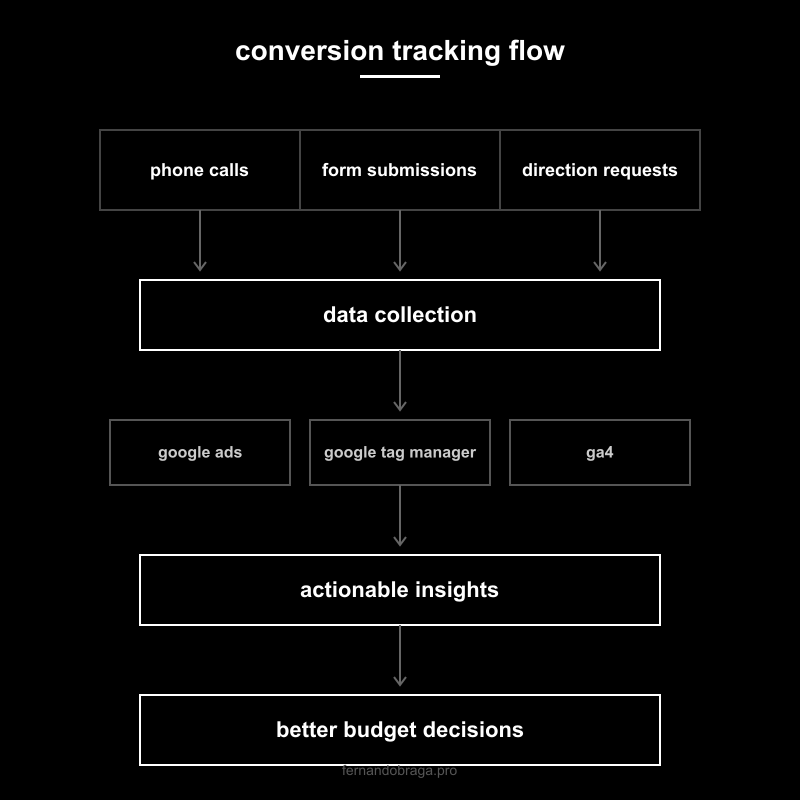
setting up conversion tracking step by step
there are three layers to a solid tracking setup. each one adds more accuracy and more data to work with.
google ads conversion tracking
this is the minimum. without this, google ads can’t optimize your campaigns.
- in google ads, go to goals > conversions > new conversion action.
- choose “website” for form submissions or “phone calls” for call tracking.
- for website conversions, google gives you a global site tag and an event snippet. the global tag goes on every page. the event snippet goes on your thank-you page (the page people see after submitting a form).
- for phone calls, enable call reporting in your account settings and add call extensions to your campaigns.
- set a conversion value if you know your average customer value. this helps google’s bidding algorithms prioritize higher-value conversions.
test it. submit your own form, call your own number. check the conversions tab in google ads within 24 hours to confirm it’s recording.
google tag manager setup
gtm (google tag manager) is a container that manages all your tracking codes in one place. instead of adding code directly to your website every time you want to track something, you add it through gtm.
why use it:
- you can track form submissions without a thank-you page (using event listeners).
- you can track button clicks, scroll depth, video views, and other engagement signals.
- you can manage google ads, ga4, and facebook pixel all from one dashboard.
- changes don’t require editing your website code. you publish through gtm’s interface.
basic gtm setup for lead tracking:
- create a gtm account and container for your website.
- install the gtm container snippet on your site (if you’re on wordpress, use a plugin like “GTM4WP”).
- create a trigger for form submissions (built-in form trigger or custom event from your form plugin).
- create a tag that fires your google ads conversion tracking when the trigger activates.
- test in gtm’s preview mode before publishing.
ga4 integration
ga4 (google analytics 4) gives you the full picture of what happens on your website. it connects to google ads so you can see the entire journey: ad click > site visit > pages viewed > conversion.
link ga4 to google ads:
- in ga4, go to admin > google ads links > link.
- select your google ads account and confirm.
- enable auto-tagging in google ads (settings > auto-tagging).
- import your ga4 conversions into google ads (goals > conversions > import > google analytics 4).
with ga4 connected, you can see which keywords, ads, and campaigns drive not just clicks, but actual engagement and conversions. you can also build audiences for remarketing based on site behavior.
call tracking. what it is and whether you need it
google’s built-in call tracking uses a google forwarding number. it replaces your phone number on the ad with a google number that forwards to your real number. this tracks call duration and whether the call came from an ad.
the limitation: it only tracks calls from ads, not calls from your website after someone clicked an ad.
third-party call tracking (like CallRail, WhatConverts, or CallTrackingMetrics) solves this by:
- assigning a unique tracking number to each traffic source (google ads, seo, social, direct).
- recording calls so you can review lead quality.
- integrating with your crm to connect calls to specific customers.
- providing keyword-level tracking (which search term triggered the call).
do you need it? if phone calls are your primary conversion (and for most local service businesses, they are), yes. the cost is typically $40 to $100/month, which pays for itself if it helps you identify even one wasted campaign.
if you’re just getting started and budget is tight, google’s built-in call reporting is enough to start. upgrade to third-party tracking once your ad spend is above $1,500/month.
reading your data. what the numbers actually mean
tracking is useless if you don’t know how to read the data. here are the key metrics and what they tell you:
- conversions. total number of tracked actions (calls + forms + directions). this is your lead count.
- conversion rate. percentage of clicks that turned into conversions. for local services, 5% to 15% is healthy. below 5% means your landing page or targeting needs work.
- cost per conversion. total spend divided by conversions. this is your cost per lead. for local businesses, $20 to $80 per lead is typical depending on industry. this is one of the most important metrics to understand when evaluating how google ads works for local businesses.
- search terms report. the actual phrases people typed before clicking your ad. review this weekly to add negative keywords and find new keyword opportunities.
a practical way to think about it: if your average customer is worth $500 and your cost per lead is $50 with a 50% close rate, you’re paying $100 to acquire a $500 customer. that’s a 5x return. that’s the number that tells you whether google ads management is actually worth the investment.
the tracking checklist before launching any campaign
don’t launch a single campaign until every item on this list is done:
- google ads conversion tracking installed and tested with a real form submission.
- call reporting enabled in google ads settings.
- call extensions added to all campaigns.
- google tag manager installed with form submission triggers configured.
- ga4 linked to google ads with auto-tagging enabled.
- ga4 conversions imported into google ads.
- test conversions verified in both google ads and ga4 within 24 hours.
- conversion values set (even estimates) so google’s bidding can optimize for value.
skip any of these and you’re spending money without the data to know if it’s working. every dollar you spend before tracking is set up is a dollar you can’t learn from.
not sure if your tracking is set up correctly? request a free audit and i’ll check your google ads conversion tracking, ga4 setup, and tell you exactly what’s missing.
is your business visible on google?
get a free, no-obligation audit of your google presence. i'll show you exactly where you're leaving money on the table.
get your free audit