
why your bidding strategy makes or breaks your campaign
you can have the perfect keywords, great ad copy, and a landing page that converts. but if your bidding strategy is wrong, none of it matters.
your bidding strategy tells google how to spend your money. pick the wrong one and you’ll burn through your budget with nothing to show for it. pick the right one and every dollar works harder.
the problem? google defaults to settings that favor google, not you. and most small business owners never change them.
i’ve managed google ads campaigns for over 150 local businesses. the single biggest factor in whether a small budget performs well or fails? the bidding strategy. here’s what actually works at each stage.
manual cpc. when it makes sense
manual cpc (cost per click) means you set the maximum amount you’re willing to pay for each click. google won’t go above that number.
why it works for small budgets: you have complete control. if you’re spending $500-$1,500/month, this control matters. you decide exactly how much each keyword is worth to you.
when to use it:
- you’re launching a new campaign with zero conversion data
- your budget is under $1,000/month
- you want to test which keywords actually bring leads before letting google optimize
the downside: it takes time. you need to check bids regularly and adjust based on performance. but for small budgets, that hands-on approach prevents waste.
start here. set your bids conservatively. let data accumulate for 2-4 weeks before considering anything automated.
maximize clicks. the budget-drainer trap
maximize clicks tells google one thing: get as many clicks as possible within your budget. sounds good on paper. in practice, it’s one of the most common google ads mistakes i see.
the problem: google doesn’t care about click quality. it will find the cheapest clicks available, which are usually low-intent searches from people who will never convert.
i’ve audited campaigns where maximize clicks was burning 60-70% of the budget on irrelevant traffic. the clicks were cheap, but they were worthless.
when it actually works:
- brand awareness campaigns where conversions aren’t the goal
- very short testing periods where you need traffic volume fast
- campaigns with extremely tight keyword lists where every click is relevant
for most local service businesses? skip it. the cost per lead with this strategy is almost always higher than manual cpc.
maximize conversions. the sweet spot (with enough data)
maximize conversions uses google’s machine learning to get you as many conversions as possible within your budget. this is where things get interesting.
why it works: google analyzes hundreds of signals you can’t see. time of day, device, location, browsing history, search behavior. it uses all of this to find people most likely to convert.
the catch: it needs data to work. specifically, you need:
- at least 15-30 conversions in the last 30 days
- properly configured conversion tracking (calls, forms, bookings)
- a budget that allows enough daily clicks to generate those conversions
without enough conversion data, google is guessing. and google’s guesses with your money are expensive.
the transition: start with manual cpc. once you have 15+ conversions in 30 days with consistent tracking, switch to maximize conversions. this is the strategy that works best for most local businesses once they have data.
target cpa. when you have conversion history
target cpa (cost per acquisition) lets you tell google: “i want each lead to cost approximately $X.” google then adjusts bids automatically to hit that target.
when to use it:
- you have 30+ conversions in the last 30 days
- you know your actual cost per lead from previous months
- your conversion volume is consistent, not spiky
how to set your target: look at your average cpa from the last 60-90 days. set your target cpa at that number or slightly above. don’t set it aggressively low. google will just stop showing your ads.
a dentist spending $2,000/month who knows their average lead costs $45 can set a target cpa of $45-50. google will optimize every auction to hit that number.
warning: if you set your target cpa too low, google restricts your impressions dramatically. you’ll spend less, but you’ll also get almost nothing. always start with a realistic target based on actual data.
target roas. advanced strategy for e-commerce and high-volume
target roas (return on ad spend) tells google: “for every $1 i spend, i want $X back in revenue.” this requires revenue tracking, not just lead tracking.
who this is for:
- e-commerce businesses with transaction value tracking
- businesses spending $5,000+/month with strong conversion data
- campaigns with variable lead values (a $10,000 case vs a $500 case)
who this is not for: most local service businesses. if you’re a lawyer, dentist, or contractor, your leads don’t have immediate trackable revenue. stick with maximize conversions or target cpa.
i mention it here because google will suggest it. don’t switch to target roas unless you have proper revenue tracking and high volume. for small budgets, it almost never makes sense.
which strategy to use based on your budget and goals
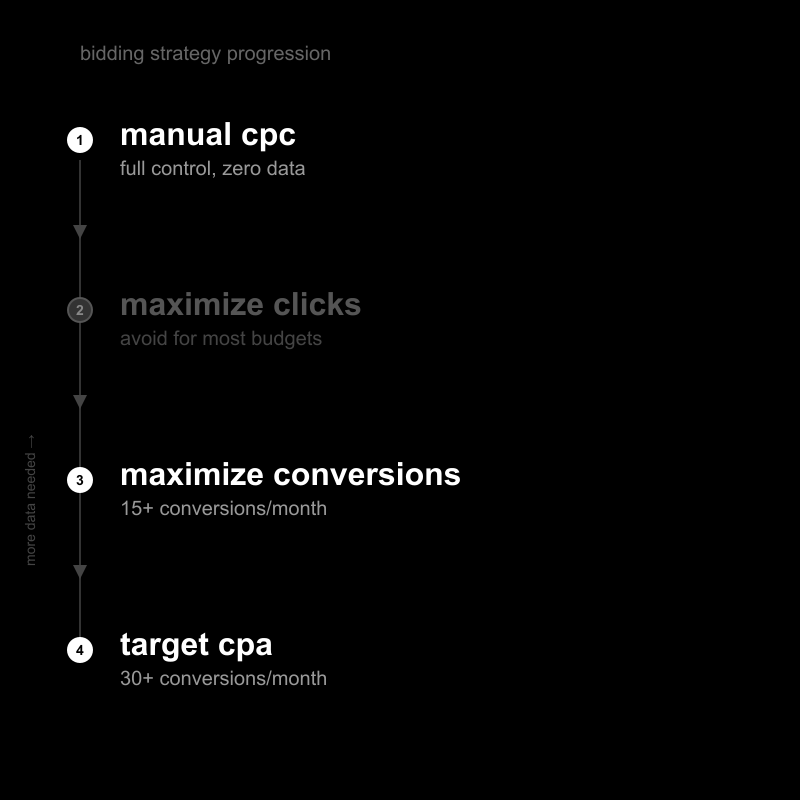
here’s the straightforward breakdown:
budget under $1,000/month: start with manual cpc. control every dollar. build your conversion data. this is not the time for automation.
budget $1,000-$3,000/month with less than 15 conversions/month: stay on manual cpc or test enhanced cpc (manual with google’s slight adjustments). you don’t have enough data for full automation.
budget $1,000-$3,000/month with 15+ conversions/month: switch to maximize conversions. you have enough data for google’s algorithm to work. monitor closely for the first 2 weeks.
budget $3,000+/month with 30+ conversions/month: use target cpa. you have the volume and data to set specific cost targets. this gives you the best balance of control and automation.
the pattern is simple: more data means more automation. less data means more manual control. never let google automate what it can’t optimize with real numbers.
how to switch strategies without tanking your campaign
switching bidding strategies is the most dangerous moment in a campaign. do it wrong and you’ll lose weeks of performance. here’s how to do it right.
never switch during a high-performance period. if your campaign is crushing it, don’t touch it. wait for a natural dip or a planned transition point.
the safe transition process:
- document your current performance: average cpc, conversion rate, cost per lead, daily spend
- make the switch at the start of a new week (monday morning)
- set a 2-week learning period. don’t change anything else during this time
- compare performance after 14 days against your documented baseline
- if performance drops more than 20%, switch back and try again in 30 days with more data
critical rule: only change one thing at a time. don’t switch your bidding strategy while also changing ad copy, keywords, or landing pages. you won’t know what caused any changes in performance.
most small businesses should plan for two transitions total: manual cpc to maximize conversions (month 2-3), then maximize conversions to target cpa (month 4-6). that’s it.
not sure which strategy fits your current setup? request a free audit and i’ll review your campaign structure, bidding, and budget allocation.