
google business profile posts are one of the most underused features in local marketing. they’re free. they take 5 minutes. and most businesses never touch them.
a gbp post is essentially a mini update that shows up on your google business profile when someone searches for your business. it can include text, an image, a link, and a call to action button.
if you’ve already optimized your profile and chosen the right categories, posts are the next step. they keep your profile active and give potential customers more reasons to engage.
this guide covers the 4 types of google business profile posts, how to write them effectively, and a simple schedule to stay consistent.
what are google business profile posts
gbp posts are short-form content that appears on your business profile in google search and maps. think of them as social media posts, but for google.
when someone searches your business name or finds you through a local search, your profile shows up. posts appear in a carousel near the bottom of your profile on mobile, or in a dedicated section on desktop.
each post can include:
- up to 1,500 characters of text (only the first 80-100 characters show before “read more”)
- a photo or video
- a call to action button (book, learn more, call now, etc.)
- a link to any url
posts expire after 6 months. offers and events expire on their end date. this means you need to post regularly to keep content visible.
do gbp posts actually help rankings
the honest answer: they are a minor ranking signal at best. google has never confirmed that posts directly boost map pack rankings. and most seo tests show little to no ranking movement from posting alone.
but that is not the full picture.
posts help in indirect ways that matter for local businesses:
- engagement signals. when people click your posts, call from your profile, or visit your website through a post link, those interactions tell google your profile is active and relevant.
- profile completeness. google favors profiles that use all available features. posts contribute to that completeness score.
- conversion rate. a profile with recent posts looks more active and trustworthy than one that has not been updated in months. this affects whether someone actually calls you.
- keyword relevance. post content gets indexed. including your target services and locations in posts reinforces what your business does and where.
the real value of gbp posts is not rankings. it is giving potential customers one more reason to choose you over the competitor whose profile looks abandoned.
the 4 types of gbp posts
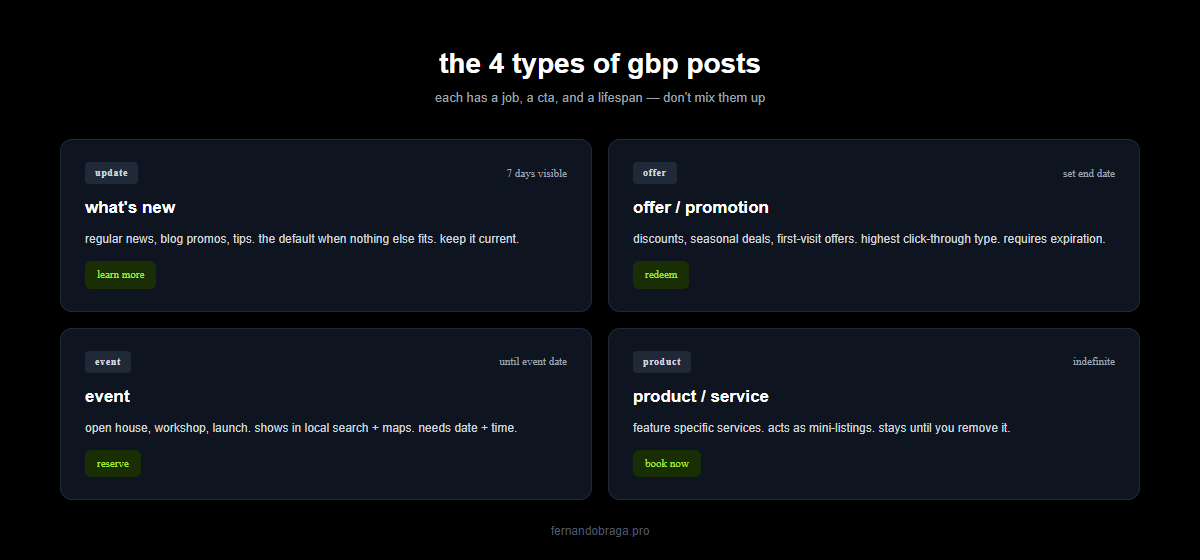
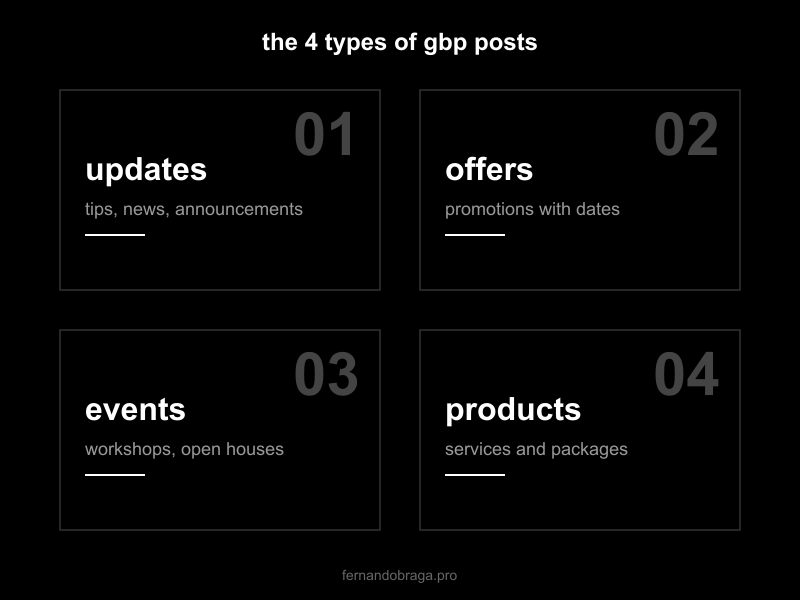
google offers 4 post types, each designed for a different purpose. here is how they work and when to use each one.
updates
the most flexible type. use updates for general announcements, tips, behind-the-scenes content, or anything that does not fit the other categories.
examples for a dental clinic:
- “accepting new patients for teeth whitening this month. book your consultation today.”
- “our team just completed advanced training in invisalign. here is what that means for your treatment options.”
updates are your bread and butter. when in doubt, use this type.
offers
for promotions with a clear start and end date. google shows these with a special “offer” tag that stands out visually.
offer posts require:
- a title
- start and end dates
- optional: coupon code, terms and conditions, link
examples: “free consultation for new patients – valid through april 30” or “20% off first visit – mention this post when you call.”
use offers sparingly. if every post is a promotion, people stop paying attention.
events
for anything with a specific date and time. workshops, webinars, open houses, community events.
event posts require a title, start/end date, and time. they stay visible until the event date passes.
even if you rarely host events, look for opportunities. a local business sponsoring a neighborhood event or participating in a health fair can post about it. it signals community involvement.
products
products appear in a dedicated “products” tab on your profile. they are ideal for businesses with specific services or packages they want to highlight.
for service businesses, think of your main services as “products.” a law firm might list “estate planning consultation” or “free case evaluation.” a dermatology clinic might list “botox treatment” or “skin cancer screening.”
product posts include a name, category, price (optional), and description. they do not expire like other post types.
how to write posts that drive action
most gbp posts fail because they are written like afterthoughts. a blurry photo, two generic sentences, no clear next step. here is how to do better.
structure and formatting
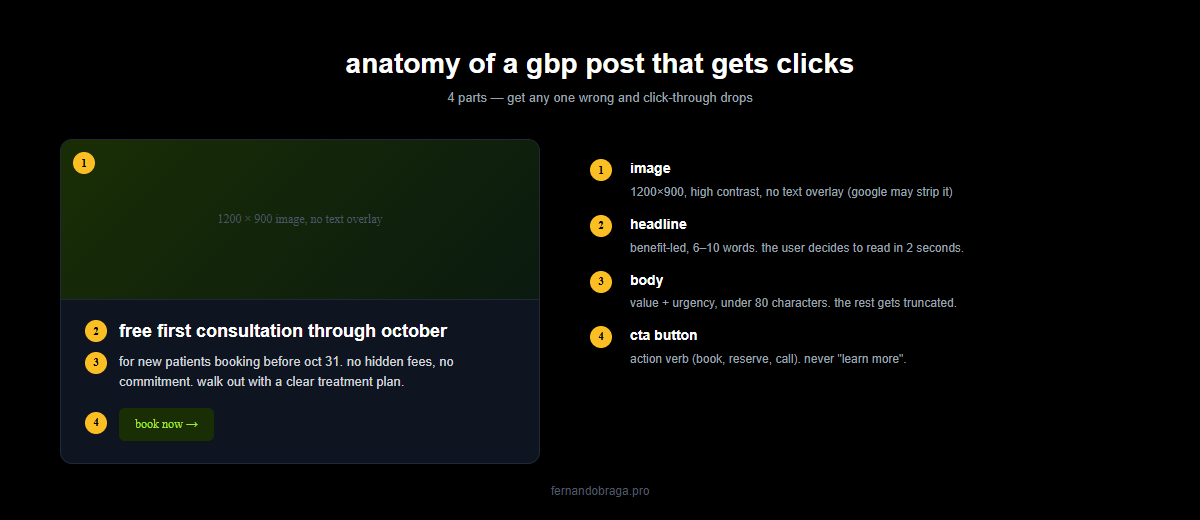
keep posts between 150-300 characters for maximum impact. the first 80 characters are critical because that is all that shows before the “read more” link.
follow this formula:
- hook. lead with the benefit or the problem you solve. not your business name.
- detail. one or two sentences of context. what, when, why it matters.
- action. tell them exactly what to do next. call, book, visit your site.
bad example: “we are a dental clinic in rio de janeiro offering various services.”
good example: “tired of sensitive teeth? our new desensitization treatment takes 30 minutes and results last up to 6 months. book your evaluation today.”
images that work
posts with images get significantly more engagement than text-only posts. but not just any image.
what works:
- real photos of your office, team, or work (not stock photos)
- minimum 400×300 pixels, ideally 1200×900
- good lighting, clean background
- text overlays are fine but keep them minimal
what does not work:
- blurry phone photos
- heavily filtered images
- images with too much text (google may reject them)
- stock photos that look generic
take 10 minutes to photograph your actual office, waiting room, and team. those authentic photos will outperform any stock image.
calls to action
every post should include a CTA (call to action – the button or text that tells people what to do next). google gives you several button options:
- book
- order online
- buy
- learn more
- sign up
- call now
match the button to the post type. an offer post should use “book” or “order online.” an update sharing a blog post should use “learn more.” an event should use “sign up.”
always link the button to a relevant page. do not send everyone to your homepage. if the post is about teeth whitening, link to your teeth whitening service page.
how often to post (and a simple content schedule)
posting frequency matters less than consistency. once a week is a solid target for most local businesses. twice a week is better if you can maintain it. daily is unnecessary.
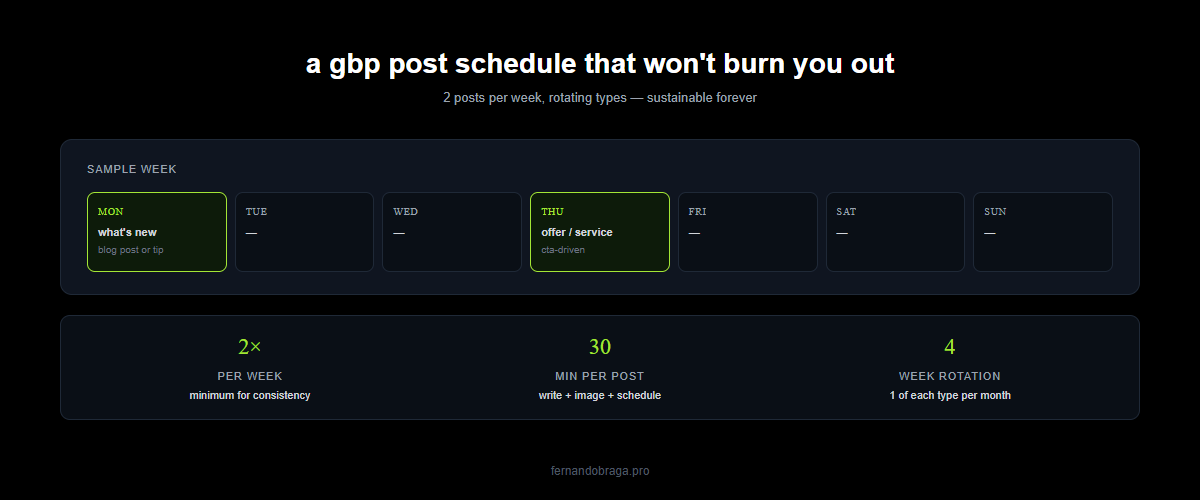
here is a simple weekly schedule that covers all bases:
- week 1: update post – share a tip related to your services
- week 2: update post – highlight a specific service or treatment
- week 3: offer post – promote a special or discount (if applicable)
- week 4: update post – share a result, testimonial highlight, or team update
add event posts whenever relevant. update product posts quarterly or when services change.
the key is building a habit. set a recurring reminder. batch-create posts for the month in one sitting. whatever keeps you consistent.
if you can only do one thing: post every monday morning. one update post with a real photo and a clear call to action. that alone puts you ahead of 90% of local competitors.
tracking post performance
google provides basic analytics for each post inside your gbp dashboard. you can see:
- views. how many times the post was shown to users
- clicks. how many people clicked the CTA button
these numbers are helpful for comparing which post types and topics perform best. but they do not tell the whole story.
to get better data, use UTM parameters on your post links. instead of linking to yoursite.com/service, link to yoursite.com/service?utm_source=gbp&utm_medium=post&utm_campaign=april-offer. this lets you track gbp post traffic in google analytics separately from other sources.
track these metrics monthly:
- which post types get the most views
- which CTAs get the most clicks
- whether post traffic converts (fills out a form, makes a call)
over time, you will see patterns. maybe offer posts outperform updates. maybe posts with team photos get more engagement than service descriptions. use that data to refine your approach.
gbp posts will not transform your business overnight. but combined with a well-optimized profile, strong reviews, and consistent effort, they are one more advantage in local search.
not sure if your google business profile is fully optimized? request a free audit and i will review your profile, posts, and local visibility.