
most local businesses lose money on google ads. not because the platform doesn’t work, but because the campaigns are set up wrong from the start.
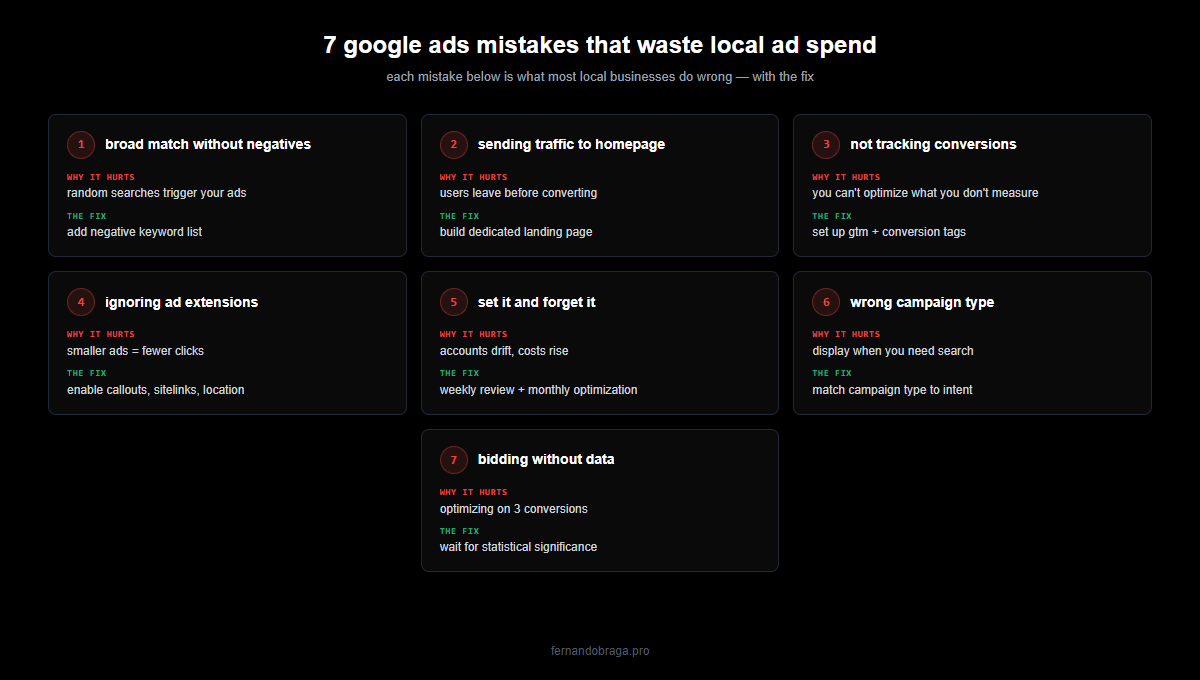
after managing google ads for 150+ local businesses across healthcare, automotive, education, and professional services, i see the same mistakes over and over. here are the 7 most common ones, and how to fix each.
why most local ad campaigns fail
google ads is a system. keywords, bids, landing pages, tracking, and targeting all need to work together. when one piece is off, the whole thing underperforms.
the problem is that most business owners (or their agencies) treat it like a slot machine. throw money in, hope for calls. that approach leads to wasted budget and frustration.
these 7 mistakes are the ones i fix most often when auditing accounts.
mistake 1: targeting broad match keywords without negatives
broad match keywords tell google to show your ad for anything related to your keyword. “dentist” becomes “dental school admission” or “dentist salary.” you pay for clicks that will never convert.
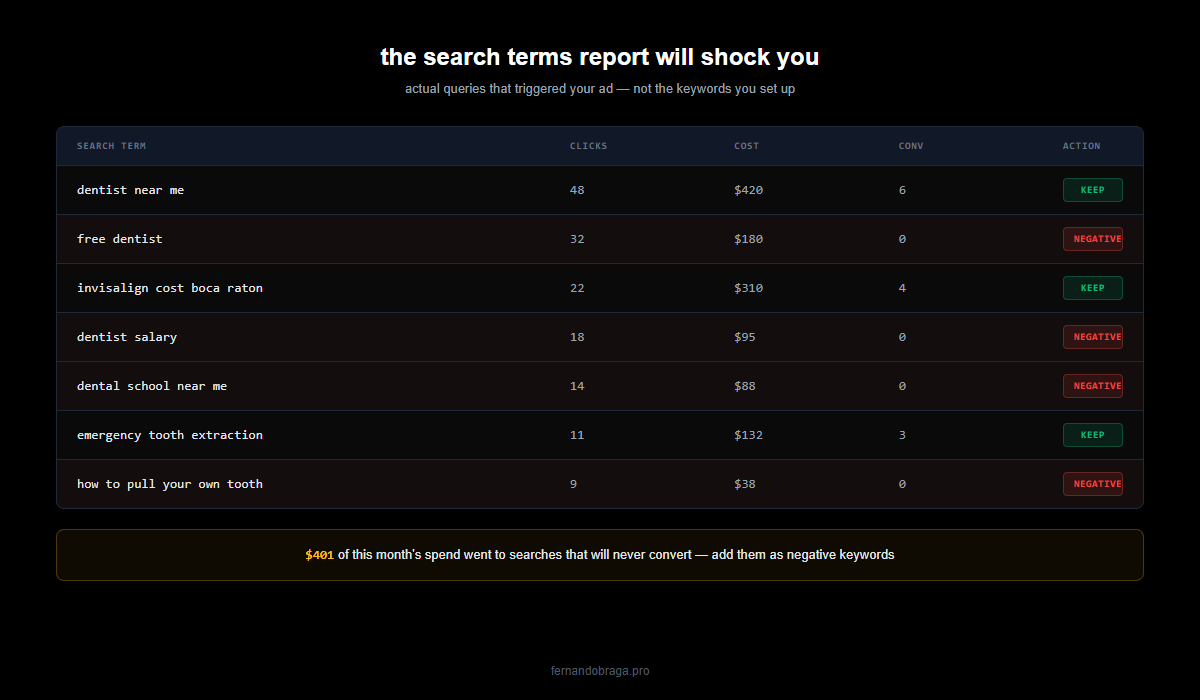
the fix: use phrase match or exact match for core keywords. if you use broad match, build a negative keyword list from day one. check your search terms report weekly for the first month.
mistake 2: sending traffic to your homepage
your homepage talks about everything. a person searching “teeth whitening near me” needs a page about teeth whitening, not a page about your clinic history, team, and 15 different services.
the fix: create dedicated landing pages for each service or campaign. one page, one offer, one call to action. match the page content to the search intent.
mistake 3: not tracking conversions properly
this is the most damaging mistake on this list. without conversion tracking, you have no idea which keywords, ads, or campaigns generate actual leads. you are flying blind.
i have audited accounts spending thousands per month with zero conversion tracking set up. they had no idea if their ads were working.
the fix: set up conversion tracking for every valuable action: phone calls (with minimum duration), form submissions, whatsapp clicks, direction requests. use google tag manager for clean implementation. this is exactly what happened with a car detailing client in lisbon. their previous agency had zero tracking. once i fixed it, they hit 17x ROAS.
mistake 4: ignoring ad extensions
ad extensions (now called assets) add extra information to your ads: phone numbers, location, site links, callouts. they make your ad bigger on the page and give users more reasons to click.
most local accounts i audit have zero extensions set up. free real estate on the search results page, completely ignored.
the fix: add at minimum: sitelink extensions (link to specific services), call extensions (your phone number), location extensions (your google business profile), and callout extensions (free consultation, 10+ years experience, etc).
mistake 5: setting it and forgetting it
a google ads campaign is not a billboard. you don’t set it up and walk away. search behavior changes, competitors adjust their bids, and google’s algorithm evolves.
the fix: review your campaigns at least weekly. check search terms, adjust bids, pause underperforming keywords, test new ad copy. the accounts that perform best are the ones that get consistent attention.
mistake 6: wrong campaign type for your goal
performance max campaigns are popular right now. google pushes them hard. but for most local service businesses, a well-structured search campaign outperforms pmax, especially when the budget is under $1,000/month.
the fix: start with search campaigns targeting high-intent keywords. add pmax later as a supplement, not a replacement. if your goal is phone calls from people actively searching for your service, search campaigns are your best bet.
mistake 7: bidding without data
automated bidding strategies like “maximize conversions” need data to work. if you turn on maximize conversions with 3 conversions in the last month, google has nothing to optimize toward.
the fix: start with manual CPC or maximize clicks to gather data. once you have 30+ conversions in a 30-day period, switch to target CPA or maximize conversions. let the algorithm learn before you trust it to decide.
mistake 8: a slow landing page
this one gets overlooked because it has nothing to do with the ads account itself. but it can waste 30-50% of every dollar you spend.
if your mobile landing page takes 5 seconds to load, more than half of your paid clicks bounce before the page renders. you paid google for 100 clicks, you only have a chance to convert 47 of them. at a $25 cpc, that is $2,500 spent, effectively $53 per visitor who actually saw your offer. at $50 cpc (common for legal, insurance, HVAC), it is worse.
and there is a second hit: google uses page speed as a quality score input. faster pages get cheaper clicks. slower pages get penalized on bidding. the gap compounds every month.
the fix: run your landing page through pagespeed insights. anything over 3 seconds on mobile is a fire. fixing it is almost always higher roi than any bid adjustment or new keyword. if your site is built on a heavy page builder or an old theme, a rebuild focused on speed often pays for itself in saved ad spend within 90 days.
how to audit your own campaign in 15 minutes
open your google ads account and check these five things:
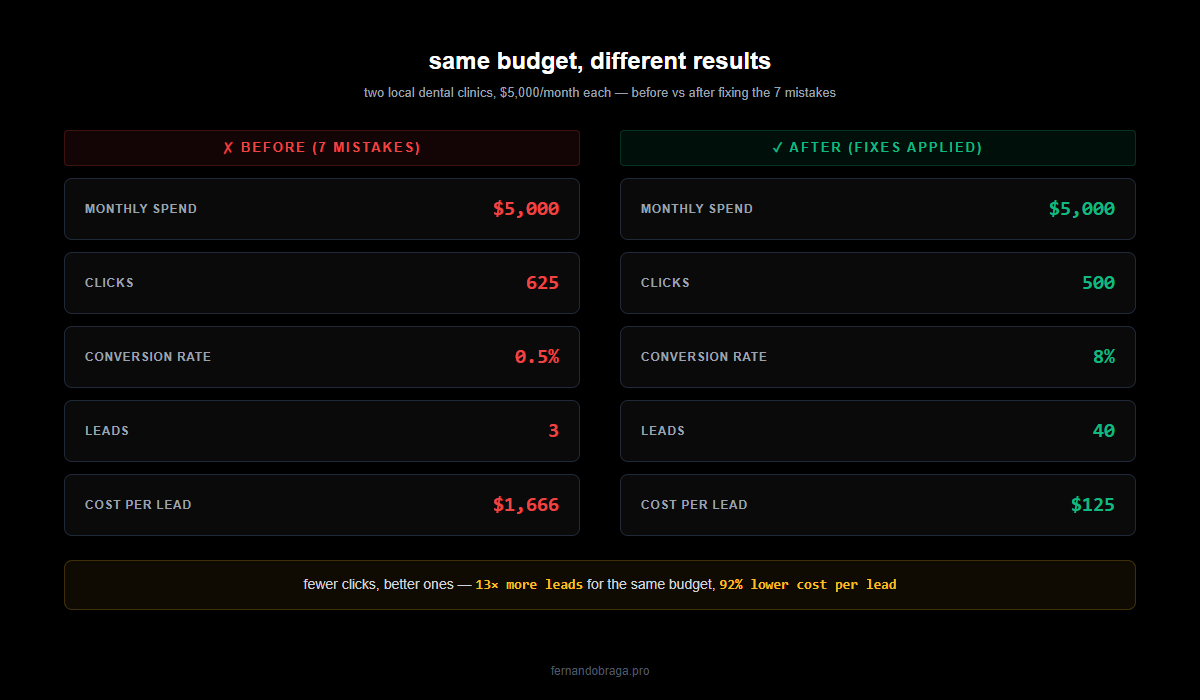
- search terms report: are you paying for irrelevant searches? add negatives immediately.
- conversion tracking: go to tools > conversions. if it says zero or “no recent conversions,” that is your priority.
- landing pages: click your own ads. does the page match what you searched for? is there a clear call to action?
- ad extensions: check if you have at least sitelinks, call, and location extensions active.
- quality score: check keyword quality scores. anything below 5 needs attention (ad relevance, landing page experience, or expected CTR).
if you found issues in 3 or more of these areas, your campaign has significant room for improvement.
want a professional audit? get a free google ads audit and i will review your account with specific recommendations you can act on.